 Google Classroom Support
Google Classroom Support
Google Classroom Support
Your teacher will have provided a username and password for Google Classroom. If you use Chromebooks in school then your login details will be the same as you use for that but you will need to enter the full email address.
If you dont know your login then please contact your teacher or school.
We recommend using Google Chrome on laptops and computers or the Classroom app on mobile devices. If you have not already set this up then click here for more info.
It's possible that you can have more than one Google account on the device that you are using. You will need to make sure that you are using your account when you access Google Classroom or other apps. If you don't then you might get Access Denied error messages.
To check which account you are using you should tap or click th user icon at the top right of the screen or app. If you havent changed it then it will probably be a letter or your initial.
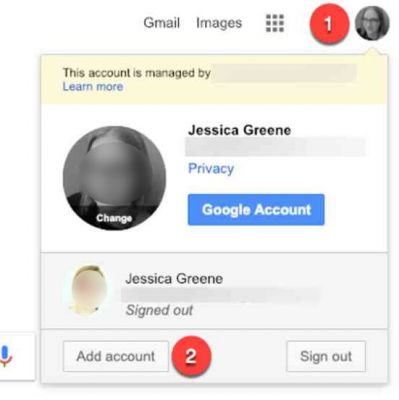
From there you will be able to select from the accounts on the device or add another account.
If you are using Google Chrome then you can have multiple profiles so that each person in thhousehold can have their own settings, bookmarks and accounts. You can use school account for this purpose if you want. For more information click the link below.
https://support.google.com/chrome/answer/2364824?co=GENIE.Platform%3DDesktop&hl=en